What is an internet domain name and how can it help you?
By Phil Donaldson, owner of www.anyware.co.nz.
If you are starting a new business, you probably know that you need to register your
domain name to protect it from someone else buying it first.
But what exactly are you buying, and what does it have to do with email and web sites?
A domain name is like your brand name in cyber-space. You use it to put your own
brand name on your email address and your web site.
The easiest way to explain a domain name is to show you what it does for your email
and web site addresses.
 Your Email Address
When you sign up for an Internet connection with your internet service provider (ISP), you get an
email address. Any email sent to your email address is delivered to a mailbox that sits at your ISP.
This mailbox is quite similar to the mailbox at the end of your driveway - email is delivered to it,
and you empty it. You empty your mailbox by clicking the send/receive button in your email program.
The Domain Name for Your Email Address
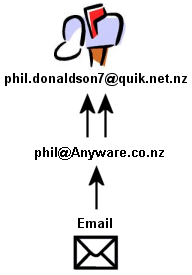
Your ISP will give you an email address that looks something like phil.donaldson7@quik.net.nz,
where phil.donaldson7 is the user name your ISP gives you and quik.net.nz is the domain name
of your ISP.
Note that the first part of the email address (phil.donaldson7) identifies a person and the second
part (quik.net.nz) is a domain name that identifies an organisation.
But you're in business now, and you want people to see your brand name (Anyware),
not the brand name of your ISP. So you want your email address to look like this:
phil@anyware.co.nz.
When you register your domain name (Anyware.co.nz) any email that is sent to
phil@anyware.co.nz can automatically be forwarded to your mailbox at your ISP
(phil.donaldson7@quik.net.nz).
So instead of advertising the name of your ISP in your email address, you're advertising
your own name.
Your Web Site Address
A web site is simply a collection of documents in a particular format that you can look at over
the Internet. The difference between these and any other collection of documents is that you
have to host them on a computer that is connected to the internet (hence the term "Web Hosting").
When you open an email account, most ISPs will let you create your own (small) web site
and host it for you for free, or very cheaply.
Unfortunately the address will look something like this:
www.quik.net.nz/homepages/~phil.donaldson7/
Good luck asking your customer to remember that!
When you register your domain name your web site address becomes
www.anyware.co.nz.
Not only does this look professional, but now there's a good chance your customers will
remember how to find your web site.
Show Your Customers You Are Serious
How seriously you would take me if I asked you to send me email at phil.donaldson7@quik.net.nz,
or if I asked you to look at my web site at www.quik.net.nz/homepages/~phil.donaldson7/ ?
You may think I'm working out of my garden shed, and go look for a professional!
A domain name is a small expense, but it's the first purchase you should make if you want
to be taken seriously by potential customers who use email and the Internet.
Happy domain name shopping,
About the Author
Since 1998, Phil Donaldson has helped hundreds of business owners understand, in plain English, how their web sites can help their businesses grow, and find the simplest solutions to do it.
If you'd like to apply this system to your business, but don't have the time or inclination to complete all the steps yourself then we can help.
Contact www.anyware.co.nz for professional web design and search engine marketing services in Wellington, New Zealand.
Free content for your web site, see: Search Engine Optimisation Article
|
Free Content For Your Web Site or E-zine!
You now have permission to reprint "Anyware Insights" newsletter articles on your web site or in your e-zine, provided you leave the entire article intact including the "About the Author" notice.
You have permission to change any links within the article body to link to your own web site but you must leave the "About the Author" section unchanged.
You must also send an e-mail to info@anyware.co.nz and include the following information:
- Your full name
- Your e-mail address
- The web site URL and/or publication where the article(s) will appear
- The issue number(s) of the article(s) you wish to reprint
- Confirm that you will meet the TWO requirements listed above
Enjoy!
|
View HTML source for Article
Back to Articles Page
|